 Butler
一群 Claude Code 同时开工,
谁做了什么,大家都知道。
Many Claude Code sessions.
One shared memory.
Butler 让每个 ticket 有自己的 Claude Code session,并让这些 session 共用一份分层的本地记忆。后端 session 记下的接口改动,前端 session 读得到;哪个 session 需要你拍板,它会排在最前面等你。 With Butler, every ticket gets its own Claude Code session, and those sessions share a layered local memory. What the backend session writes down, the frontend session reads. When one of them needs you, it waits at the top of the list.
MIT 开源 · 记忆和状态存在本机 · 用你自己登录的 claude MIT licensed · memory and state live on your machine · runs your own logged-in claude
共享记忆 · 结账金额Shared memory · Checkout totals
实际用法How it's used
从 Jira 里现成的 ticket,到一组在干活的 sessionFrom tickets already in Jira to a set of working sessions
Butler 不替你规划,也不替你拆需求。它做的是把「一个 ticket 一个 Claude Code session」这件事管起来:开 session、分组、看状态、记下和传递上下文。下面是一个 epic 从规划到开工的真实流程。 Butler doesn't plan for you or split requirements for you. It runs the "one Claude Code session per ticket" way of working: opening sessions, grouping them, showing their state, and keeping and passing on context. This is how an epic actually goes from plan to work.
-
1
ticket 早就在 Jira 里The tickets are already in Jira
产品已经把需求写成了 ticket。Butler 不拆 ticket,也不连 Jira:读 Jira 的是你自己的 Claude Code,通过它自己的 Jira MCP。Product has already written the tickets. Butler doesn't split them and doesn't connect to Jira: your own Claude Code reads Jira, through its own Jira MCP server.
-
2
在 epic session 里理成几个 featureSort them into features in an epic session
在 epic 页打开一个 epic session,和 Claude 一起把这些 ticket 归成几个 feature,理清先后,以及前后端怎么配合。定下来的 feature 由 epic session 建出来,附上一份规划:做什么、为什么、已经定了什么。Open an epic session on the epic page and work out with Claude which tickets form which feature, in what order, and how frontend and backend fit together. When a feature is settled, the epic session creates it with a short plan: what to build, why, and what is already decided.
create_feature -
3
打开 feature 的总控,开工Open the feature's coordinator and start
点进 feature,打开它的总控。总控第一次打开时会收到这份规划,以及同一个 epic 里其他 feature 的进展。它建好 ticket,再给每个 ticket 开一个 session,把任务发过去。一个 feature 最多同时跑 8 个终端。Click into the feature and open its coordinator. The first time, it receives the plan plus the progress of the epic's other features. It creates the tickets, then opens a session in each one and hands it a task. A feature runs at most 8 terminals at once.
create_ticketstart_session -
4
你只处理「需要你」的You handle what needs you
「现在」页把每个 session 按 epic / feature / ticket 排好,等你回答、等你确认、或者卡住了的,会置顶。每晚 Butler 用你自己登录的 claude 给有进展的 ticket 写一份交接(handoff),第二天的 session 一 recall 就接得上。The Now page lists every session by epic, feature and ticket, and pins the ones waiting for an answer, a confirmation, or stuck. Every night Butler asks your own logged-in claude to write a handoff for each ticket that moved, so the next day's session picks up from it with one recall.
gh 读取。Butler 也没有自己的 Jira、GitHub 或 Claude 登录。
Jira, Linear or GitLab are read by your own Claude Code through its own MCP servers; PRs are read by claude with your gh. Butler has no Jira, GitHub or Claude login of its own.
三层记忆Layered memory
「大家都知道」是怎么做到的How "everyone knows" actually works
Butler 内置了本地的 StateCore 记忆,给它打开的每个 session 都接上几份记忆。session 用 remember 记下,用 recall 读到。总控不会往别的 session 的终端里打字,大家知道彼此做了什么,靠的就是这几份共用的记忆,一层套一层。
Butler embeds a local StateCore memory and connects every session it opens to a few memories. A session writes with remember and reads with recall. A coordinator never types into another session's terminal. What keeps everyone in sync is these shared memories, nested one inside the next.
butler-epicepic session 记下的规划和决定,加上各个 feature 的最新进展(最近的 10 个):feature 一有新总结,Butler 就自动改写这一份。epic 下面所有 session 都读得到。Planning notes and decisions from the epic session, plus the latest state of its features (the 10 most recent), which Butler rewrites whenever a feature gets a new summary. Every session under the epic can read it.
butler-feature前后端之间的约定,比如接口长什么样、谁负责哪一块。feature 的总控和它所有 ticket 的 session 共用。What frontend and backend agree on, such as the shape of an API and who owns which part. Shared by the feature's coordinator and every session of its tickets.
butler-memory这个 ticket 的进度、决定、待办和每晚的交接。This ticket's progress, decisions, follow-ups and nightly handoffs.
butler-memory每个 ticket 一份,它的几个 session 共用。One per ticket, shared by that ticket's sessions.
butler-workspace在一个 ticket 里踩过的坑、摸清的环境细节,换到别的 ticket 也读得到。Gotchas and environment details learned in one ticket, readable from any other.
一个具体的例子A concrete example
后端 session 改完接口就记下一句,同一个 feature 里的前端 session 下次 recall 时读到,照着改。中间没有人转述,总控也不用去敲前端的终端。The backend session notes the API change once it lands; the frontend session in the same feature reads it on its next recall and follows it. Nobody relays it, and no coordinator has to type it into the frontend's terminal.
新 feature 接得上前面的A new feature picks up where others left off
feature 的总控第一次打开时,会收到同一个 epic 里其他 feature 的名字、状态、最新进展、阻碍、决定和未决问题,已归档的也在内。之后它随时可以用 epic_context 读最新的情况。When a feature's coordinator first opens, it receives the name, status, latest progress, blockers, decisions and open questions of the epic's other features, archived ones included. Later it can read the latest with epic_context.
总控看得到每个 session 在做什么The coordinator sees what every session is doing
总控用 list_sessions 看每个 session 在写代码、跑测试、等 CI 还是在等你,用 session_activity 看某一个的动态和最后一段命令输出。The coordinator uses list_sessions to see whether each session is writing code, running tests, watching CI or waiting for you, and session_activity for one session's activity and its last command output.
记忆在你自己的电脑上The memory lives on your computer
这些记忆都存在本机的 SQLite 里,在 ticket 页的「记忆」标签能看到每一条的来历。Butler 自己写进去的交接、决定和待办不需要任何模型 key。All of it is stored in local SQLite, and the ticket page's Memory tab shows each entry's history. What Butler writes itself (handoffs, decisions, follow-ups) needs no model key.
「现在」页The Now page
打开 Butler,先看到的是需要你的Open Butler and see what needs you first
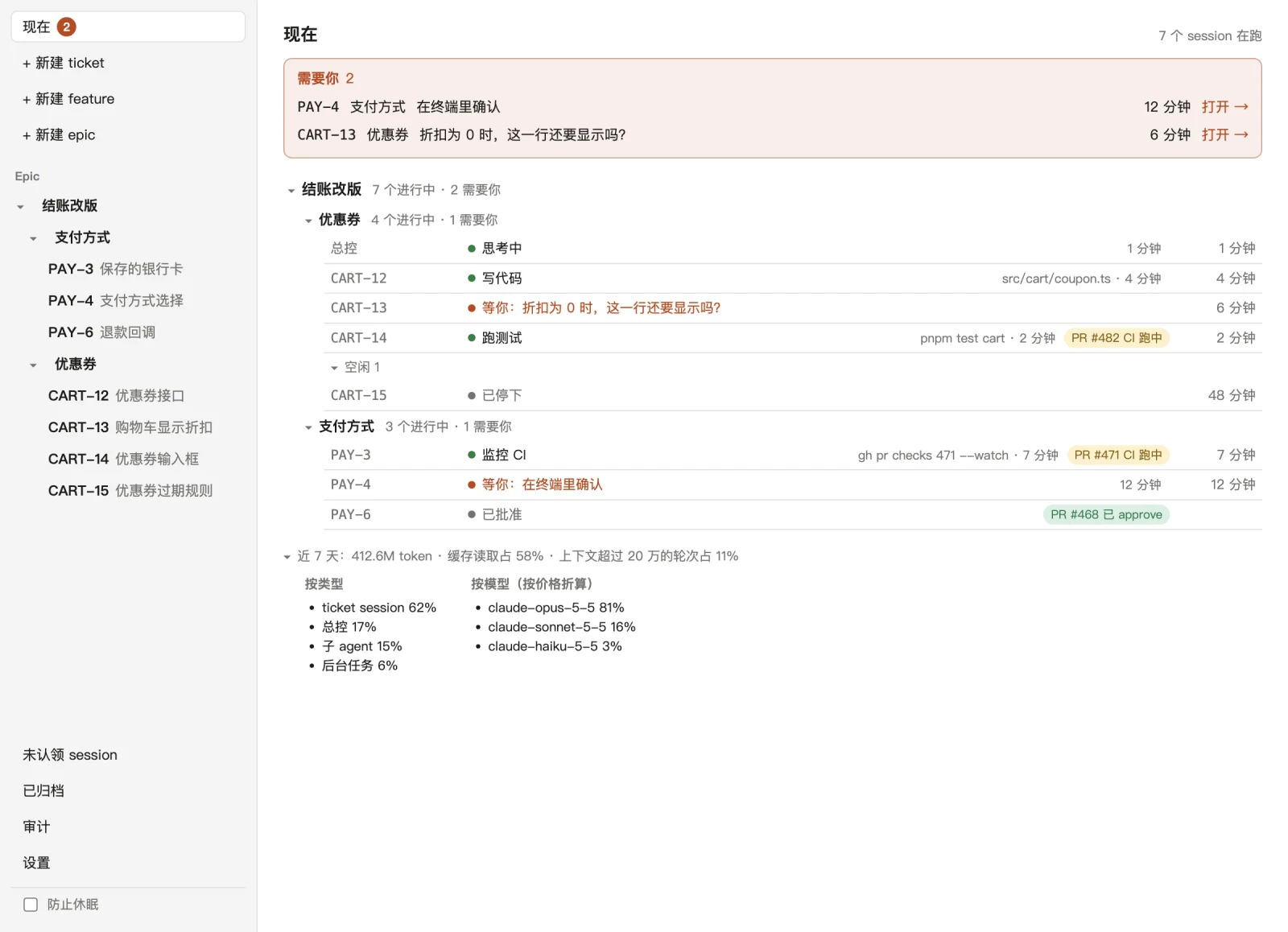
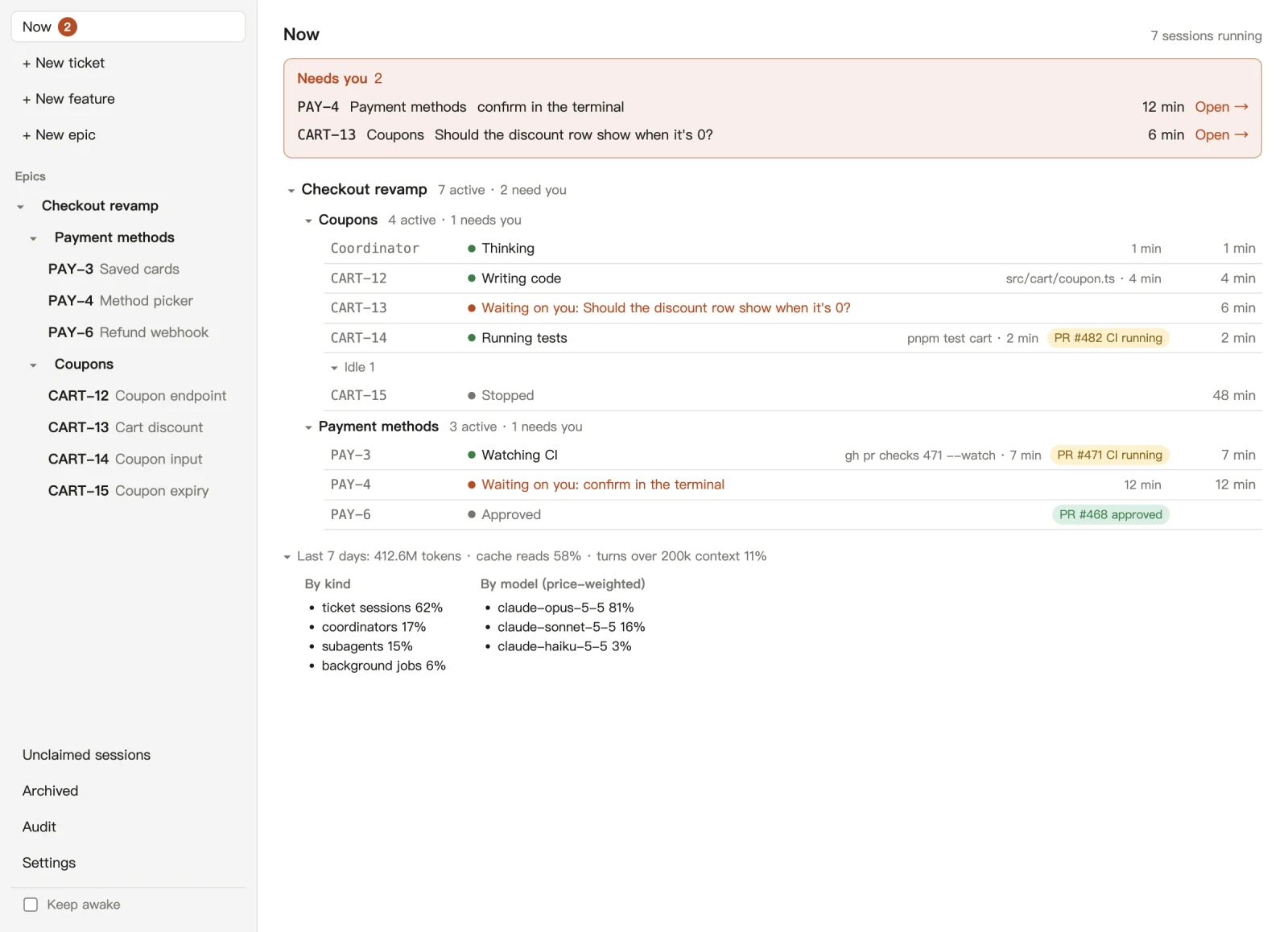
首页「现在」列出 Butler 开的每一个 session,按 epic、feature、ticket 分组。每一行写着它此刻在做什么:写代码(哪个文件)、跑测试、等 CI、思考中,后面是它的 PR 和 CI,以及这个状态持续了多久。The home page, Now, lists every session Butler opened, grouped by epic, feature and ticket. Each row says what the session is doing right now (writing code and in which file, running tests, watching CI, thinking), followed by its PR and CI and how long it has been at it.
等你的 session 置顶在「需要你」里,原因只有三种:它问了你一个问题、它停在权限确认上、或者它卡住了。侧栏的「现在」后面会显示有几个。Sessions waiting on you are pinned at the top under Needs you, for one of three reasons: they asked you a question, they stopped on a permission prompt, or they are stuck. The sidebar shows how many there are.
点一行就打开它的终端,接手、回答或者批准都在那里。没在干活的 session 会折起来,页面底部有一行近 7 天的 token 用量。Click a row to open its terminal, where you take over, answer or approve. Idle sessions fold away, and the bottom of the page has one line of token usage for the last 7 days.
Token 用量Token usage
一行字,看出 token 花在了哪儿One line that shows where the tokens went
一群 session 同时跑,最容易问的就是「这周用了多少,都用在哪了」。「现在」页最底下有一行近 7 天的用量,点开能看到按类型和按模型的拆分。 With many sessions running at once, the obvious question is how much this week used, and on what. The bottom of the Now page has one line for the last 7 days; click it for the split by kind and by model.
按类型By kind
按模型(按价格折算)By model (price-weighted)
算进去的是什么What it counts
Butler 打开的 session(在跑的和刚退出的)、它们的子 agent,以及 Butler 在后台跑的 claude:写交接、写 feature 总结、检查 session 是不是卡住了。The sessions Butler opened (running and just exited), their subagents, and the claude runs Butler starts in the background: handoffs, feature summaries and stuck checks.
从哪里读Where it comes from
直接读你本机上 Claude Code 的 transcript,不需要另外接什么。Claude Code's transcripts on your machine. There is nothing else to connect.
占比只用来比较Shares are for comparing
各项占比按相对价格加权,所以同样多的 token,用在 Opus 上比用在 Haiku 上占得多。Butler 不把它换算成钱。The shares are weighted by relative price, so the same tokens count for more on Opus than on Haiku. Butler doesn't convert them to money.
本地优先Local-first
它是你电脑上的一个应用,不是一项服务An app on your computer, not a service
Butler 不在你和 Claude Code 之间加一层服务器。它管的是你自己的 claude,用的是你自己的登录。
Butler puts no server between you and Claude Code. It manages your own claude, signed in as you.
数据在本机的 SQLite 里Data in local SQLite
ticket、session、交接、设置在 ~/.butler/app.db,记忆在 ~/.butler/statecore/statecore.db。升级重装时这些都保留。Tickets, sessions, handoffs and settings are in ~/.butler/app.db; memory is in ~/.butler/statecore/statecore.db. Both are kept when you install a new version.
没有账号,没有遥测No accounts, no telemetry
Butler 没有账号,不做授权校验,不发遥测,也不检查更新。它没有自己的 Jira、GitHub 或 Claude 登录。Butler has no accounts or license checks, sends no telemetry and doesn't check for updates. It has no Jira, GitHub or Claude login of its own.
数据怎么离开你的电脑How data leaves your machine
只有两条路:你自己的 claude,以及你配置了才有的个人 LLM API。这个 API 只在隐私档位为「完整」时用来做记忆提炼,每一次调用都记在「审计」页上。默认档位是「仅元数据」,不会调用它。Only through your own claude and, if you configure one, a personal LLM API. That API is called only at the full privacy level, for memory distillation, and every call is logged on the Audit page. The default level, metadata, never calls it.
只有一处联网代码One piece of network code
Butler 里唯一的联网代码,是给可选的个人 API 用的隐私网关。这一点由一条 lint 规则保证。The only network code in Butler is the privacy gateway for the optional personal API. A lint rule enforces this.
只在你点了之后改 Claude Code 配置Claude Code config changes only when you click
点「安装 hook」时,Butler 往用户级 settings.json 加四个 hook(第一次会先备份这个文件),再写一个 /handoff 命令,你原有的 hook 和命令都保留,在设置里随时能卸载。记忆不用 claude mcp add 注册,而是在它启动的每个 session 上传 --mcp-config。When you click the hook install, Butler adds four hooks to your user-level settings.json (backing the file up the first time) and writes a /handoff command, keeping your other hooks and commands. You can uninstall from Settings. Memory is never registered with claude mcp add; Butler passes --mcp-config to each session it starts.
MIT 开源MIT licensed
源码在 GitHub 上,可以自己读、自己构建。Intel Mac 需要从源码构建。The source is on GitHub to read and build yourself. Intel Macs need to build from source.
安装Install
下载、放行、跑一遍向导Download, allow it, run the wizard
安装包在 GitHub 的 Releases 页上。目前的构建没有代码签名,所以浏览器和系统都会提醒你,下面写了怎么放行。 The installers are on the GitHub Releases page. The builds are not code-signed yet, so your browser and OS will warn you; here is how to allow them.
需要You need
- Apple 芯片的 macOS,或 Windows 10/11 x64macOS on Apple silicon, or Windows 10/11 x64
- 装好并登录的 Claude Code,终端里
claude --version能跑Claude Code installed and logged in:claude --versionworks in a terminal PATH上有 Git;Windows 上装 Git for WindowsGit onPATH; on Windows, Git for Windows- 可选:在 Claude Code 里配好 tracker 的 MCP(Jira、Linear、GitLab…),交接才能读 ticket 状态Optional: a tracker MCP server (Jira, Linear, GitLab, …) in Claude Code, so handoffs can read ticket status
macOS Butler-x.y.z-arm64.dmg
- 打开
.dmg,把 Butler 拖进「应用程序」。Open the.dmgand drag Butler into Applications. - 打开 Butler,macOS 会拒绝,说无法验证这个 App。Open Butler. macOS refuses and says it cannot verify the app.
- 打开「系统设置 → 隐私与安全性」,往下找到关于 Butler 的提示,点「仍要打开」并确认。或者在终端里去掉隔离标记:Open System Settings → Privacy & Security, find the message about Butler, click Open Anyway and confirm. Or remove the quarantine flag in Terminal:
xattr -dr com.apple.quarantine /Applications/Butler.app如果 macOS 说 Butler「已损坏,无法打开」,就没有「仍要打开」按钮,用上面的终端命令。每次下载新版本都要再做一次。If macOS says Butler "is damaged and can't be opened", there is no Open Anyway button; use the Terminal command. Repeat this after every new download.
Windows Butler-Setup-x.y.z.exe
- 浏览器可能提醒这个下载。在 Edge 里打开下载项的「…」菜单,选「保留」。Your browser may warn about the download. In Edge, open the download's … menu and choose Keep.
- 运行安装程序。SmartScreen 提示「Windows 已保护你的电脑」时,点「更多信息 → 仍要运行」。Run the installer. When SmartScreen says "Windows protected your PC", click More info → Run anyway.
- 选「仅为我安装」(不需要管理员权限),再选安装目录。Pick "only for me" (no admin rights needed) and an install folder.
如果 Windows 11 开着「智能应用控制」,它会直接拦下未签名的应用,没有「仍要运行」,这时装不了 Butler。If Windows 11 Smart App Control is on, it blocks unsigned apps with no Run anyway option, and Butler can't be installed.
/handoff 命令,让你挑交接可以调用的只读 tracker 工具,最后是可选的隐私档位和个人 API。没有自动更新:升级就是下载新版本装在旧版上,~/.butler 里的数据保留。细节见 README 的 Install 和 First run。
It finds your claude, offers to install the hooks and the /handoff command, lets you pick the read-only tracker tools handoffs may call, and ends with the optional privacy level and personal API. There is no auto-update: to upgrade, install the new version over the old one, and your data in ~/.butler is kept. Details are in the README's Install and First run sections.
如果你也是一个人开着一堆 Claude Code,可以试试看。If you also keep a pile of Claude Code sessions open, give it a try.